Check pull requests for drift
Add the drift check to GitHub Actions so every pull request is compared with your diagram, and fix what it finds.
What you'll get
- A drift check on every pull request
- A comment that lists what changed
- A diagram that stays true
Create a read-only API key
The check reads files in your repo, such as docker-compose, Kubernetes, Terraform, OpenAPI, Prisma and SQL, and compares them with a diagram. It needs an API key, and it does not need an AI agent.
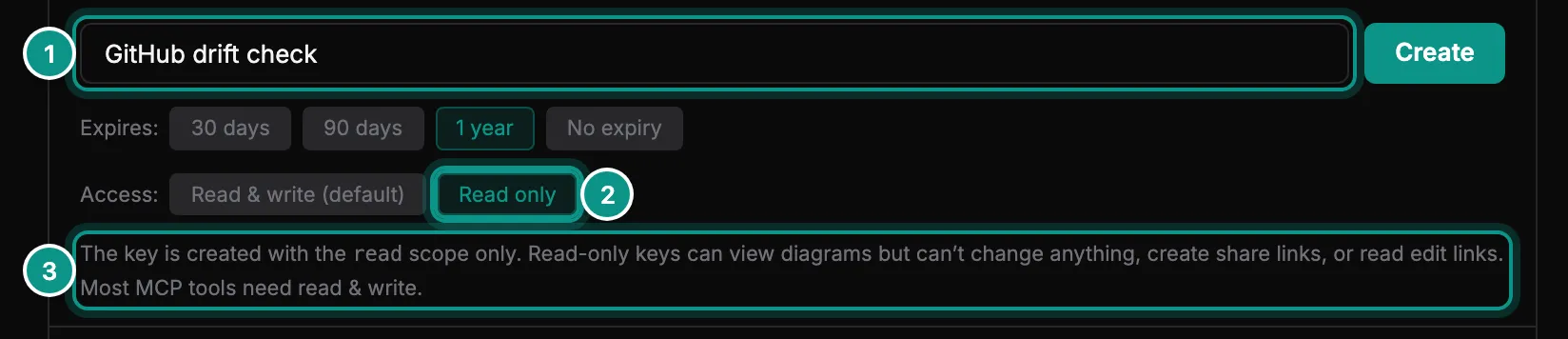
Open Account, then API keys, and click Create key. Name it (1), for example GitHub drift check, choose Read only (2) and click Create. A read-only key can look at diagrams but change nothing (3), which is all a pull request check needs.
Copy the key. In your GitHub repository, open Settings, then Secrets and variables, then Actions, and add it as a secret named MODUDRAFT_API_KEY.
Add the workflow
Add this file to your repository as .github/workflows/drift-pr.yml:
on: [pull_request]
permissions: { contents: read, pull-requests: write }
jobs:
  drift:
    runs-on: ubuntu-latest
    steps:
      - uses: actions/checkout@v4
      - uses: modudraft/drift-check@v1
        with:
          api-key: ${{ secrets.MODUDRAFT_API_KEY }}
          diagram: <diagram-id>
          on-drift: fail
Replace <diagram-id> with your diagram’s id: the part after /d/ in its address. With on-drift: fail, a pull request that drifts from the diagram fails the check. report only reports. The action also takes dir, comment, remove-missing, allow-update-on-pr, mcp-version and github-token. The CI docs explain each one.
pull-requests: write lets the action post its comment. Pull requests from forks get no secrets, so there the action skips the check with a warning instead of failing.
Point it at your diagram
To say which files to check, add modudraft.json to the root of your repository and commit it. It holds no secrets.
{
  "$schema": "https://modudraft.com/schema/modudraft.json",
  "diagram": "3f1c9a52-7b4e-4d2a-9c61-0e8b5d7a4f19",
  "sources": [
    "docker-compose.yml",
    "infra/**/*.tf",
    "db/schema.prisma",
    { "path": "api/openapi.yaml", "node": "Orders API" }
  ]
}
With the diagram named here, you can leave diagram out of the workflow. Files such as docker-compose.yml and Terraform map onto the diagram by themselves. Database and API files belong to one component, so name it with node. Without modudraft.json, the check uses the files your diagram was imported from.
Read the result
On each pull request the action posts one comment and updates it on every push. This example is a pull request that adds a search service to docker-compose.yml.
- The first line counts the changes on each tab.
- Checked lists every file the check read.
- Each tab with changes gets a section, with a line for each change: what changed (added, removed or changed), the item and the file it comes from.
- Errors and warnings, if there are any, come last.
When the code and the diagram agree, the comment says In sync. The check ends with one of three exit codes:
0: in sync, report mode, or the update worked.1: drift, withon-drift: fail.2: an error, such as a file that does not parse, a bad key or a rate limit. A crash never looks like drift.
Fix the drift
If the code is right, bring the diagram up to date. Your agent can run the same check and apply it:
- You
The drift check on my pull request says search-service is in docker-compose.yml but not in the E-commerce checkout diagram. Update the diagram.
sync_projectPreviewed the sync frommodudraft.json: one node to add,search-servicefromdocker-compose.ymlsync_projectWrote the change to the diagram, so it is in version history- Agent
Done. search-service is on the E-commerce checkout diagram now. Push again or re-run the check, and it should pass.
Or open the diagram and add the missing parts by hand. Then push again, or re-run the check.
To update the diagram after a merge instead, run the action on pushes to main with on-drift: update-diagram and a key that can write. It changes the diagram, never your code. The CI docs have that workflow too.
Architecture: +1 node
Checked:
docker-compose.ymlArchitecture
search-service·docker-compose.yml